Free Resource
What a pricing page needs so ChatGPT recommends you. If your pricing page says contact us for a quote, or lists plan names with no prices, an AI answer has nothing in it to quote. Here's what to put on it instead: eleven sections, in order, with what goes in each and why.
What will this cost me is one of the first things buyers ask an AI. A pricing page has the best chance of being named when it answers that plainly: what people actually pay, what they get for it, and which option suits them.
The reel covered five ideas from this blueprint. Here they are with the drawings, in the order they sit on the page.
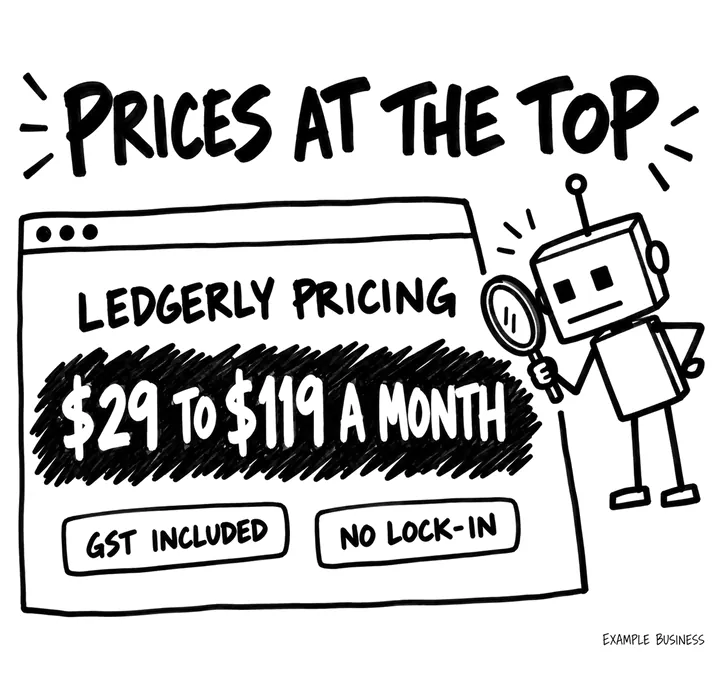
Real prices, or your usual range, in the first screen, with whether GST is included and whether there's a lock-in. Published prices give an AI answer something accurate to quote, instead of a guess or someone else's number.
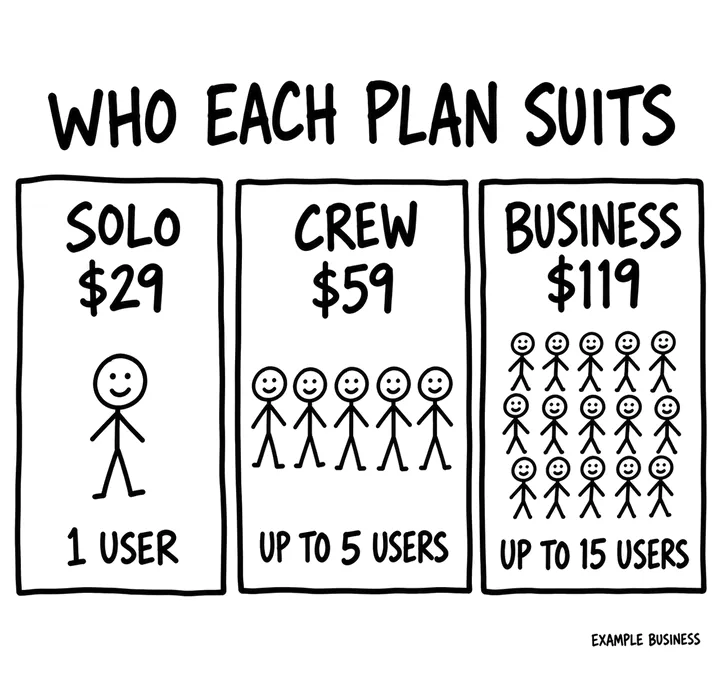
One line per plan or price level on who it's for, and who should pick another, in terms buyers recognise, like team size or type of job. It helps people, and an AI answering for them, pick the right option without a sales call.
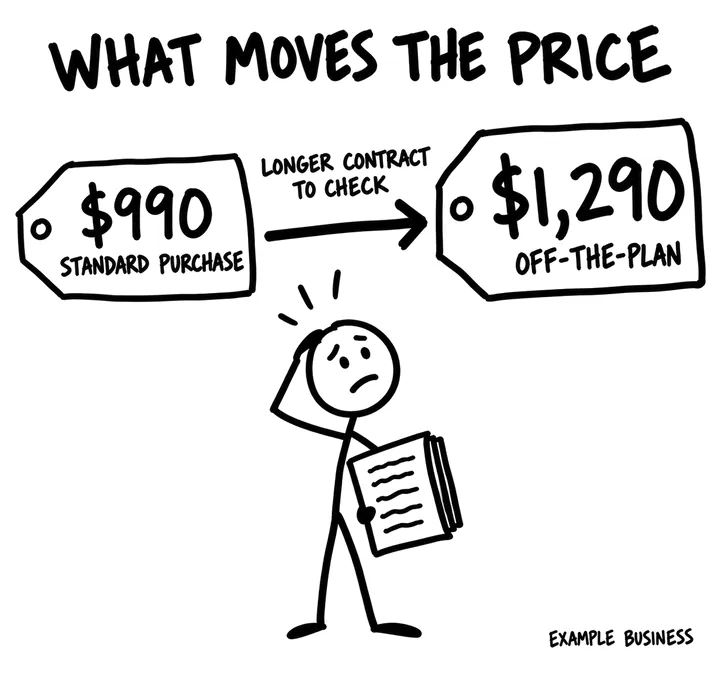
If every job is different, show the range for each type of job and what pushes a job up or down it. In this example the fee covers the conveyancing work, with searches and government fees on top. A range with its reasons answers the question. Contact us for a quote doesn't.
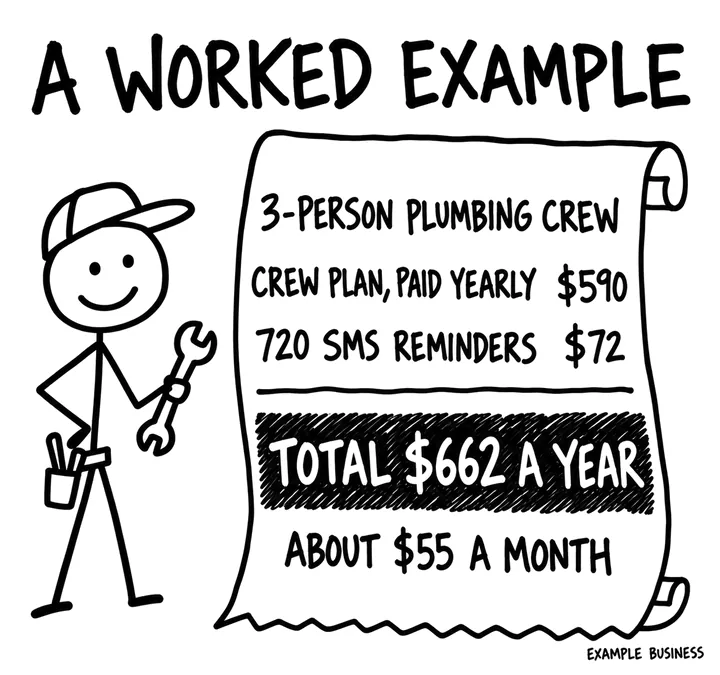
Two or three worked totals for typical buyers, every fee included, for the first month and the first year, based on what real customers pay. It answers what buyers actually want to know: what will I pay, all up?
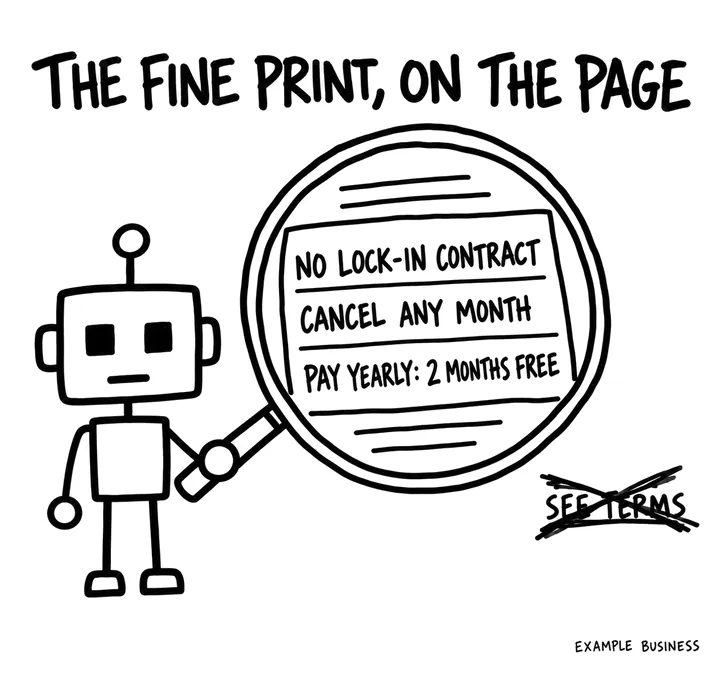
Contract length, cancelling, refunds and every discount with its conditions, on the pricing page itself. Terms buried in the fine print are harder for buyers, and AI, to compare.
The drawings use invented example businesses. The figures show the level of detail a page needs, not advice.
Eleven sections, in the order they sit on the page. The letter in brackets is the part of SOURC-E each one serves: Structure, Offsite, Uniqueness, Relevance, Credibility or Evaluation.
An H1 that says what the prices are for. Under it, two or three sentences a buyer could quote: the starting price or the usual range, the main options, whether prices include GST, and whether there is a contract.
Budget questions are among the most common buyer questions, and the opening lines are often what an AI lifts into its answer. A page that opens with a pitch before the numbers loses both.
A table with each plan or job type, its price, the billing period and the headline limits, such as users, jobs or hours. Show both the monthly and the yearly price in the HTML, not only the one a toggle displays.
A table lets a buyer and a model compare options at a glance. Real numbers can be quoted; contact us for pricing cannot.
One line per plan or price level on who it is for and who should pick another, in terms buyers recognise, such as team size or type of job.
Which one do I need is one of the main questions a pricing page has to answer. A stated fit lets a model match an option to a buyer's situation.
What every option includes, what each step up adds, and a plain list of what no option includes.
Exclusions are what buyers find out too late. Stating them up front stops wrong-fit sign-ups and makes the inclusions believable.
Usage limits, overage charges, add-ons, setup or call-out fees, card surcharges and anything billed per use, each with its price.
Extras are the usual reason a quoted price turns out wrong. Listing them helps the total a buyer, or an AI, works out match the invoice.
For services and custom work, show ranges by job type and the factors that move a job up or down the range, such as size, access, urgency or complexity, with a rough effect for each.
Services rarely have one price. Explaining the drivers turns a range into something a buyer can apply to their own job, and gives an AI the reason quotes vary.
Two or three worked totals for typical buyers, all fees included, for the first month and the first year. Base them on what real customers pay, and say so.
A worked total answers what will I actually pay, which a list of unit prices does not. Examples drawn from your own customers are evidence nobody else can publish.
Contract length, notice period, cancellation and refund terms, whether prices include GST, and every discount with its conditions, such as yearly billing or not-for-profit rates.
Lock-in and GST are deciding questions for Australian buyers. A discount without its conditions is a price nobody can rely on.
The date the prices were last checked, the role of the person who owns them, and a short change log when a price moves.
Prices are time-sensitive facts. A dated, owned page tells buyers and AI systems which numbers are current; a date with no owner behind it proves nothing.
The pricing questions your sales and support team actually get, such as can I change plans mid-month, each answered in two to four sentences.
Real questions in real words match how people ask AI about cost. They also clear the objections that stop a buyer at the last step.
One clear next step for each kind of buyer, such as start a trial or book a quote, with the phone number as text, and links to the comparison and use-case pages.
Keeps a ready buyer moving and sends an undecided one to the page that helps them choose.
Ledgerly, invoicing and quoting software for trades (an invented business, to show the level of detail). These lines are from a few of the sections: copy the specificity, not the words.
Missing schema here is a small gap, and Google says structured data is not required for its AI features. If you do mark up prices, every price, currency and period must match the visible table exactly, because markup that disagrees with the page is worse than none. Product prices belong in Product markup on the product pages, matching the Merchant Center feed.
Once a month, ask these in ChatGPT, Perplexity and Google AI Mode with your details filled in, in a fresh chat each time, and note whether you're named, linked and described correctly.
Ask the pricing questions above in ChatGPT, Perplexity and Google AI Mode once a month and record the price each one quotes; a wrong or old price is a fix to make here and wherever that price still lives.
GA4 shows AI Assistant sessions on this page and the trials, quotes or calls that follow.
Ask sales how many first calls start with the buyer already knowing the price; over time, you'd hope that number rises.
The free AI Visibility Check skill gives you real customer questions to run in ChatGPT and other AI tools, then scores the answers you paste back.
Put your real prices, or your usual range, in the first screen of your pricing page, with whether GST is included. If you know what most jobs cost, contact us for a quote is the one answer that doesn't help.
